Scale #n8n: The Ultimate Guide to Queue Mode & Docker
Learn how to effectively scale n8n workflows using Queue Mode and Docker to optimize performance and reliability in automation processes.
Written by
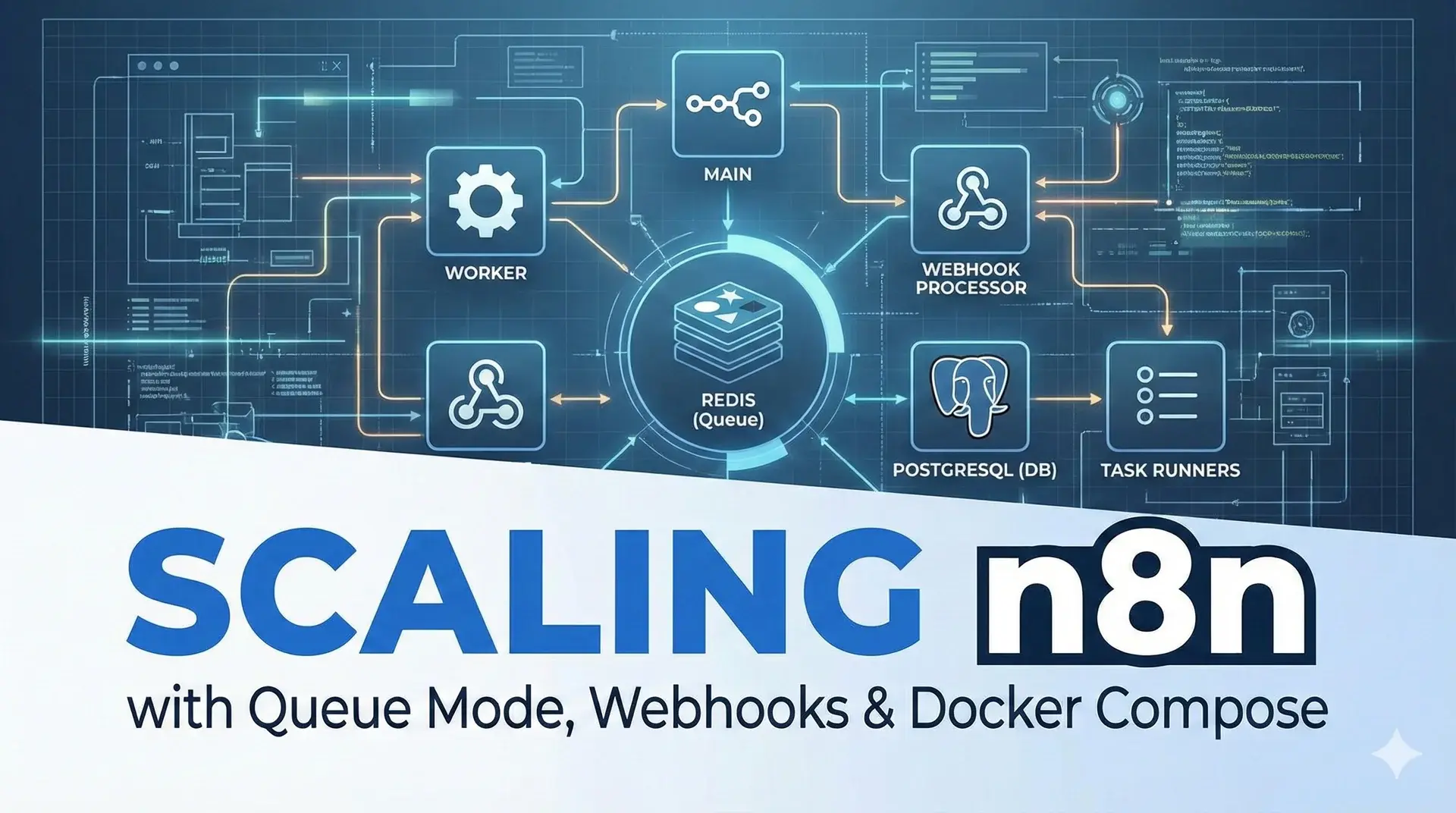
What problem are we solving?
By default, n8n runs as a single process that does everything: it serves the UI, receives webhooks, executes workflows, manages triggers... When you have a lot of workflows or high traffic, that single process becomes a bottleneck.
The solution is to separate responsibilities:
| Component | What it does |
|---|---|
| Main | Serves the editor, manages the API and triggers (cron, polling) |
| Worker | Executes the workflows (the heavy lifting) |
| Webhook Processor | Receives incoming HTTP requests for webhooks |
| Task Runner | Executes code from Code nodes (JS/Python) safely and in isolation |
| Redis | Message queue that connects everything |
| PostgreSQL | Shared database |
💡 Think of it like a restaurant: the Main is the maître d' who takes orders, Redis is the counter where order tickets are placed, the Worker is the chef, the Webhook Processor is the dedicated entrance for online delivery orders, and the Task Runners are the specialized prep cooks handling specific ingredients.
Visual Architecture
                    ┌─────────────────┐
                    │  Reverse Proxy  │
                    │  (Nginx/Traefik)│
                    └────────┬────────┘
                             │
              ┌──────────────┼──────────────┐
              │              │              │
              ▼              │              ▼
      ┌──────────┐          │      ┌──────────────┐
      │   Main   │          │      │   Webhook    │
      │  Editor  │          │      │  Processor   │
      │  API     │          │      │  /webhook/*  │
      │  Triggers│          │      └──────┬───────┘
      └────┬─────┘          │             │
           │     ┌──────────┘             │
           │     │                        │
           ▼     ▼                        ▼
      ┌──────────────────────────────────────┐
      │              Redis (queue)           │
      └──────────────────┬───────────────────┘
                         │
                         ▼
                  ┌──────────┐
                  │  Worker  │
                  └────┬─────┘
                       │
                       ▼
                  ┌──────────┐
                  │  Runner  │
                  │ (sidecar)│
                  └──────────┘
                       │
                       ▼
              ┌─────────────────┐
              │   PostgreSQL    │
              └─────────────────┘
Prerequisites
- A Linux server (Ubuntu 22.04+ recommended)
- Docker and Docker Compose installed
- A domain pointing to your server (for HTTPS)
- Minimum 4 GB RAM / 2 vCPU
Step 1: Create the project structure
mkdir n8n-scaling && cd n8n-scaling
touch docker-compose.yml .env
Step 2: Configure environment variables
Create your .env file. Change the passwords to your own secure ones:
    # General
N8N_VERSION=1.71.3
GENERIC_TIMEZONE=Europe/Berlin
N8N_ENCRYPTION_KEY=your-very-long-secret-key-here

    # PostgreSQL
POSTGRES_USER=n8n
POSTGRES_PASSWORD=change-this-password
POSTGRES_DB=n8n

    # Redis
REDIS_PASSWORD=change-this-redis-password

    # n8n
N8N_HOST=n8n.yourdomain.com
N8N_PROTOCOL=https
WEBHOOK_URL=https://n8n.yourdomain.com

    # Queue Mode
EXECUTIONS_MODE=queue
QUEUE_BULL_REDIS_HOST=redis
QUEUE_BULL_REDIS_PORT=6379
QUEUE_BULL_REDIS_PASSWORD=${REDIS_PASSWORD}

    # Database
DB_TYPE=postgresdb
DB_POSTGRESDB_HOST=postgres
DB_POSTGRESDB_PORT=5432
DB_POSTGRESDB_DATABASE=${POSTGRES_DB}
DB_POSTGRESDB_USER=${POSTGRES_USER}
DB_POSTGRESDB_PASSWORD=${POSTGRES_PASSWORD}

    # Task Runner
N8N_RUNNERS_MODE=external
N8N_RUNNERS_AUTH_TOKEN=your-secret-token-for-runners
OFFLOAD_MANUAL_EXECUTIONS_TO_WORKERS=true
Important: The N8N_ENCRYPTION_KEY must be identical across all processes (main, worker, webhook). If it doesn't match, n8n won't be able to read stored credentials.
Tip: To generate secure keys you can use: openssl rand -hex 32
Step 3: Create the docker-compose.yml
volumes:
  postgres_data:
  redis_data:
  n8n_data:

x-n8n-common: &n8n-common
  image: docker.n8n.io/n8nio/n8n:${N8N_VERSION}
  restart: unless-stopped
  environment: &n8n-env
    GENERIC_TIMEZONE: ${GENERIC_TIMEZONE}
    TZ: ${GENERIC_TIMEZONE}
    N8N_ENCRYPTION_KEY: ${N8N_ENCRYPTION_KEY}
    DB_TYPE: ${DB_TYPE}
    DB_POSTGRESDB_HOST: ${DB_POSTGRESDB_HOST}
    DB_POSTGRESDB_PORT: ${DB_POSTGRESDB_PORT}
    DB_POSTGRESDB_DATABASE: ${DB_POSTGRESDB_DATABASE}
    DB_POSTGRESDB_USER: ${DB_POSTGRESDB_USER}
    DB_POSTGRESDB_PASSWORD: ${DB_POSTGRESDB_PASSWORD}
    EXECUTIONS_MODE: ${EXECUTIONS_MODE}
    QUEUE_BULL_REDIS_HOST: ${QUEUE_BULL_REDIS_HOST}
    QUEUE_BULL_REDIS_PORT: ${QUEUE_BULL_REDIS_PORT}
    QUEUE_BULL_REDIS_PASSWORD: ${QUEUE_BULL_REDIS_PASSWORD}
    N8N_RUNNERS_MODE: ${N8N_RUNNERS_MODE}
    N8N_RUNNERS_AUTH_TOKEN: ${N8N_RUNNERS_AUTH_TOKEN}
  depends_on:
    postgres:
      condition: service_healthy
    redis:
      condition: service_healthy
  networks:
    - n8n-net

services:

  # ══════════════════════════════════════════════════════
  #   PostgreSQL
  # ══════════════════════════════════════════════════════
  postgres:
    image: postgres:16-alpine
    restart: unless-stopped
    environment:
      POSTGRES_USER: ${POSTGRES_USER}
      POSTGRES_PASSWORD: ${POSTGRES_PASSWORD}
      POSTGRES_DB: ${POSTGRES_DB}
    volumes:
      - postgres_data:/var/lib/postgresql/data
    healthcheck:
      test: ["CMD-SHELL", "pg_isready -U ${POSTGRES_USER} -d ${POSTGRES_DB}"]
      interval: 10s
      timeout: 5s
      retries: 5
    networks:
      - n8n-net

  # ══════════════════════════════════════════════════════
  #   Redis
  # ══════════════════════════════════════════════════════
  redis:
    image: redis:7-alpine
    restart: unless-stopped
    command: >
      redis-server
      --requirepass ${REDIS_PASSWORD}
      --maxmemory 256mb
      --maxmemory-policy allkeys-lru
    volumes:
      - redis_data:/data
    healthcheck:
      test: ["CMD", "redis-cli", "-a", "${REDIS_PASSWORD}", "ping"]
      interval: 10s
      timeout: 5s
      retries: 5
    networks:
      - n8n-net

  # ══════════════════════════════════════════════════════
  #   n8n Main
  # ══════════════════════════════════════════════════════
  n8n-main:
    <<: *n8n-common
    hostname: n8n-main
    environment:
      <<: *n8n-env
      N8N_HOST: ${N8N_HOST}
      N8N_PROTOCOL: ${N8N_PROTOCOL}
      WEBHOOK_URL: ${WEBHOOK_URL}
      OFFLOAD_MANUAL_EXECUTIONS_TO_WORKERS: ${OFFLOAD_MANUAL_EXECUTIONS_TO_WORKERS}
      N8N_RUNNERS_SERVER_URI: http://n8n-runner-main:5679
    ports:
      - "5678:5678"
    volumes:
      - n8n_data:/home/node/.n8n

  # Runner sidecar for Main
  n8n-runner-main:
    image: docker.n8n.io/n8nio/runners:${N8N_VERSION}
    restart: unless-stopped
    hostname: n8n-runner-main
    environment:
      N8N_RUNNERS_AUTH_TOKEN: ${N8N_RUNNERS_AUTH_TOKEN}
      N8N_RUNNERS_N8N_URI: http://n8n-main:5678
      N8N_RUNNERS_MAX_CONCURRENCY: 5
      GENERIC_TIMEZONE: ${GENERIC_TIMEZONE}
    depends_on:
      - n8n-main
    networks:
      - n8n-net

  # ══════════════════════════════════════════════════════
  #   Webhook Processor
  # ══════════════════════════════════════════════════════
  n8n-webhook:
    <<: *n8n-common
    hostname: n8n-webhook
    command: webhook
    environment:
      <<: *n8n-env
      WEBHOOK_URL: ${WEBHOOK_URL}
      N8N_RUNNERS_SERVER_URI: http://n8n-runner-webhook:5679
    ports:
      - "5680:5678"

  # Runner sidecar for Webhook
  n8n-runner-webhook:
    image: docker.n8n.io/n8nio/runners:${N8N_VERSION}
    restart: unless-stopped
    hostname: n8n-runner-webhook
    environment:
      N8N_RUNNERS_AUTH_TOKEN: ${N8N_RUNNERS_AUTH_TOKEN}
      N8N_RUNNERS_N8N_URI: http://n8n-webhook:5678
      N8N_RUNNERS_MAX_CONCURRENCY: 5
      GENERIC_TIMEZONE: ${GENERIC_TIMEZONE}
    depends_on:
      - n8n-webhook
    networks:
      - n8n-net

  # ══════════════════════════════════════════════════════
  #   Worker
  # ══════════════════════════════════════════════════════
  n8n-worker:
    <<: *n8n-common
    hostname: n8n-worker
    command: worker
    environment:
      <<: *n8n-env
      QUEUE_WORKER_CONCURRENCY: 10
      N8N_RUNNERS_SERVER_URI: http://n8n-runner-worker:5679

  # Runner sidecar for Worker
  n8n-runner-worker:
    image: docker.n8n.io/n8nio/runners:${N8N_VERSION}
    restart: unless-stopped
    hostname: n8n-runner-worker
    environment:
      N8N_RUNNERS_AUTH_TOKEN: ${N8N_RUNNERS_AUTH_TOKEN}
      N8N_RUNNERS_N8N_URI: http://n8n-worker:5678
      N8N_RUNNERS_MAX_CONCURRENCY: 5
      GENERIC_TIMEZONE: ${GENERIC_TIMEZONE}
    depends_on:
      - n8n-worker
    networks:
      - n8n-net

networks:
  n8n-net:
    driver: bridge
Step 4: Understand each component
PostgreSQL
The database where n8n stores workflows, credentials, and executions. It is mandatory for queue mode — SQLite is not supported.
Redis
The messenger that connects everything. When the main process receives a trigger or the webhook processor receives a request, they don't execute the workflow directly. Instead, they drop a message in Redis saying "there is pending work," and the worker picks it up.
Main
Serves the visual editor, the REST API, and manages triggers (cron, polling, persistent connections like IMAP or RabbitMQ). It doesn't run workflows — it delegates that to the worker via Redis.
Webhook Processor
A separate process dedicated exclusively to receiving webhooks (/webhook/*). It is started with the webhook command. This prevents a traffic spike in webhooks from freezing or affecting the editor's performance.
Worker
The one that does the heavy lifting. It listens to the Redis queue, picks up pending executions, and processes them. QUEUE_WORKER_CONCURRENCY=10 means it can run up to 10 workflows in parallel.
Task Runners (External Mode)
As of n8n 2.0, task runners are enabled by default. They execute the code from Code nodes (JavaScript and Python) in an isolated environment. In external mode (N8N_RUNNERS_MODE=external), each n8n process needs its own runner as a sidecar — a companion container that runs alongside it. That's why you see three runners in the docker-compose: one for main, one for the webhook, and one for the worker.
Why does this matter?
- Security: Buggy or malicious code in a Code node cannot take down n8n.
- Isolation: Runners do not have access to n8n's environment variables or filesystem.
- Stability: A script that consumes too much memory is killed without affecting anything else.
Important: The n8nio/runners image version must exactly match the n8nio/n8n version.
Step 5: Boot everything up
 # Start the infrastructure
docker compose up -d

  # Check that everything is running
docker compose ps

  # View logs in real-time
docker compose logs -f
You should see something like:
n8n-main       | n8n ready on 0.0.0.0, port 5678
n8n-webhook    | Webhook listener ready on 0.0.0.0, port 5678
n8n-worker     | Worker started successfully
Step 6: Configure the Reverse Proxy (Nginx)
You need a reverse proxy to route traffic correctly:
server {
    listen 443 ssl;
    server_name n8n.yourdomain.com;

    ssl_certificate     /etc/letsencrypt/live/n8n.yourdomain.com/fullchain.pem;
    ssl_certificate_key /etc/letsencrypt/live/n8n.yourdomain.com/privkey.pem;

    # Production Webhooks → Webhook Processor
    location /webhook/ {
        proxy_pass http://127.0.0.1:5680;
        proxy_set_header Host $host;
        proxy_set_header X-Real-IP $remote_addr;
        proxy_set_header X-Forwarded-For $proxy_add_x_forwarded_for;
        proxy_set_header X-Forwarded-Proto $scheme;
        proxy_buffering off;
    }

    # Test Webhooks ("Test workflow" button) → Main
    location /webhook-test/ {
        proxy_pass http://127.0.0.1:5678;
        proxy_set_header Host $host;
        proxy_set_header X-Real-IP $remote_addr;
        proxy_set_header X-Forwarded-For $proxy_add_x_forwarded_for;
        proxy_set_header X-Forwarded-Proto $scheme;
    }

    # Everything else (editor, API) → Main
    location / {
        proxy_pass http://127.0.0.1:5678;
        proxy_set_header Host $host;
        proxy_set_header X-Real-IP $remote_addr;
        proxy_set_header X-Forwarded-For $proxy_add_x_forwarded_for;
        proxy_set_header X-Forwarded-Proto $scheme;
        proxy_set_header Connection '';
        proxy_http_version 1.1;
        proxy_buffering off;
    }
}
The key rule: /webhook/* goes to port 5680 (webhook processor) and everything else goes to 5678 (main).
Step 7: Verify that everything works
- [ ]
docker compose ps— all containers should be "running" - [ ] You can access the editor at
https://n8n.yourdomain.com - [ ] Creating and saving a workflow works
- [ ] A webhook trigger receives external requests
- [ ] The "Test workflow" button works from the editor
- [ ] A Code node executes code without errors (runner working)
Common Errors
- "Could not find encryption key" — The
N8N_ENCRYPTION_KEYis not the same across all services. Check your.env. - Webhooks aren't arriving — Verify that your reverse proxy is routing
/webhook/*to port 5680, not 5678. - The worker isn't processing anything — Check that it can connect to Redis and PostgreSQL:
docker compose logs n8n-worker. - Task runner "unhealthy" — The version of
n8nio/runnersdoesn't matchn8nio/n8n. They must be identical.
Summary of key variables
| Variable | Value | Description |
|---|---|---|
EXECUTIONS_MODE | queue | Enables queue mode |
N8N_ENCRYPTION_KEY | (your key) | Identical across ALL processes |
N8N_RUNNERS_MODE | external | Task runners in separate containers |
N8N_RUNNERS_AUTH_TOKEN | (your token) | Authentication between n8n and runners |
OFFLOAD_MANUAL_EXECUTIONS_TO_WORKERS | true | Manual executions go to the worker |
QUEUE_WORKER_CONCURRENCY | 10 | Parallel executions for the worker |
WEBHOOK_URL | https://your.domain | Public URL for webhooks |
When do you need this?
- < 1,000 executions/day: Standard n8n with PostgreSQL is enough.
- 1,000 - 10,000 executions/day: Queue mode with 1 worker.
- > 10,000 executions/day: Add more workers and webhook processors.
- You execute code in Code nodes: Task runners in external mode (mandatory in n8n 2.0+).